
MegaKit
Internal preview · 1.0.1 · macOS 26 · Apple Silicon
MegaClick, MegaIntelligence and MegaCorners in one menu bar app.
Install
- Open the disk image and drag MegaKit onto Applications.
- Open MegaKit. macOS stops it, because it isn't signed with an Apple Developer ID yet. Click Done, not
Move to Trash.
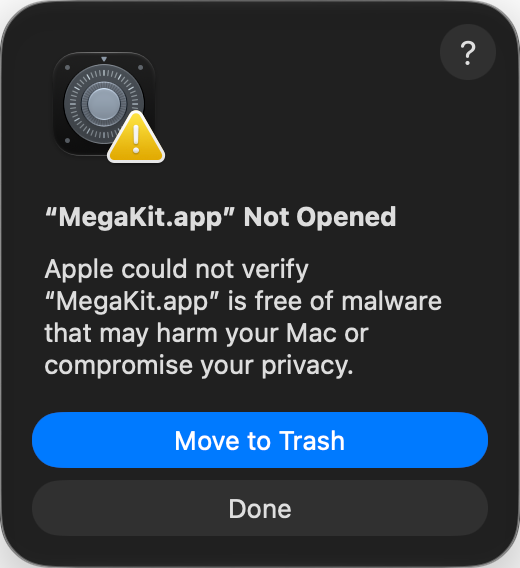
- Open System Settings → Privacy & Security, scroll down to Security and click Open Anyway.
Confirm with Touch ID or your password, then click Open.
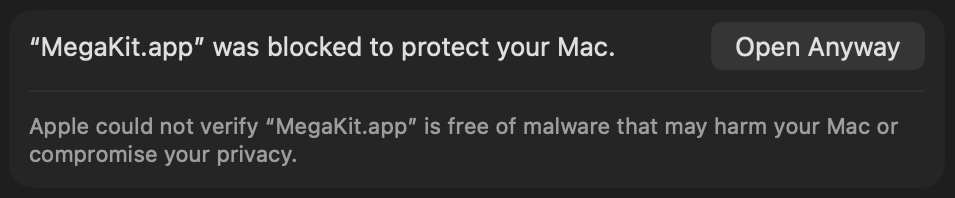 Only this once: updates open without asking.
Still “Not Opened” after Open Anyway? Some managed Macs don't keep the exception. Then run this
once in Terminal:
xattr -dr com.apple.quarantine /Applications/MegaKit.app
- The Welcome window helps you switch on the Finder extension and Accessibility.
Updates
MegaKit checks once a day and installs new versions by itself when you're not using it. Or use
Check for Updates… in its menu bar icon.